
Digital Workflow vs. Traditional Dental Lab Workflow: What Every Modern Practice Needs to Know
The fabrication time advantage of digital is real. A typical crown that took five business days through a traditional workflow can be completed in three days, sometimes less, in a digital lab that controls its own milling and printing capacity. For implant cases the gap is even larger because custom abutments that used to require a wax-up, a casting, and finishing can now be milled from titanium in a single shift.
There has never been a moment in the history of restorative dentistry quite like this one. For more than a century, the relationship between a dentist and a dental lab followed a script almost everyone in the profession could recite: take an impression in a tray, ship it to the lab, wait for stone models to be poured, wait for a wax-up, wait for casting or pressing, and eventually receive a finished restoration. That workflow, refined over generations, produced excellent dentistry — but it was slow, manual, and sensitive to dozens of points where small errors could compound into chairside frustration.
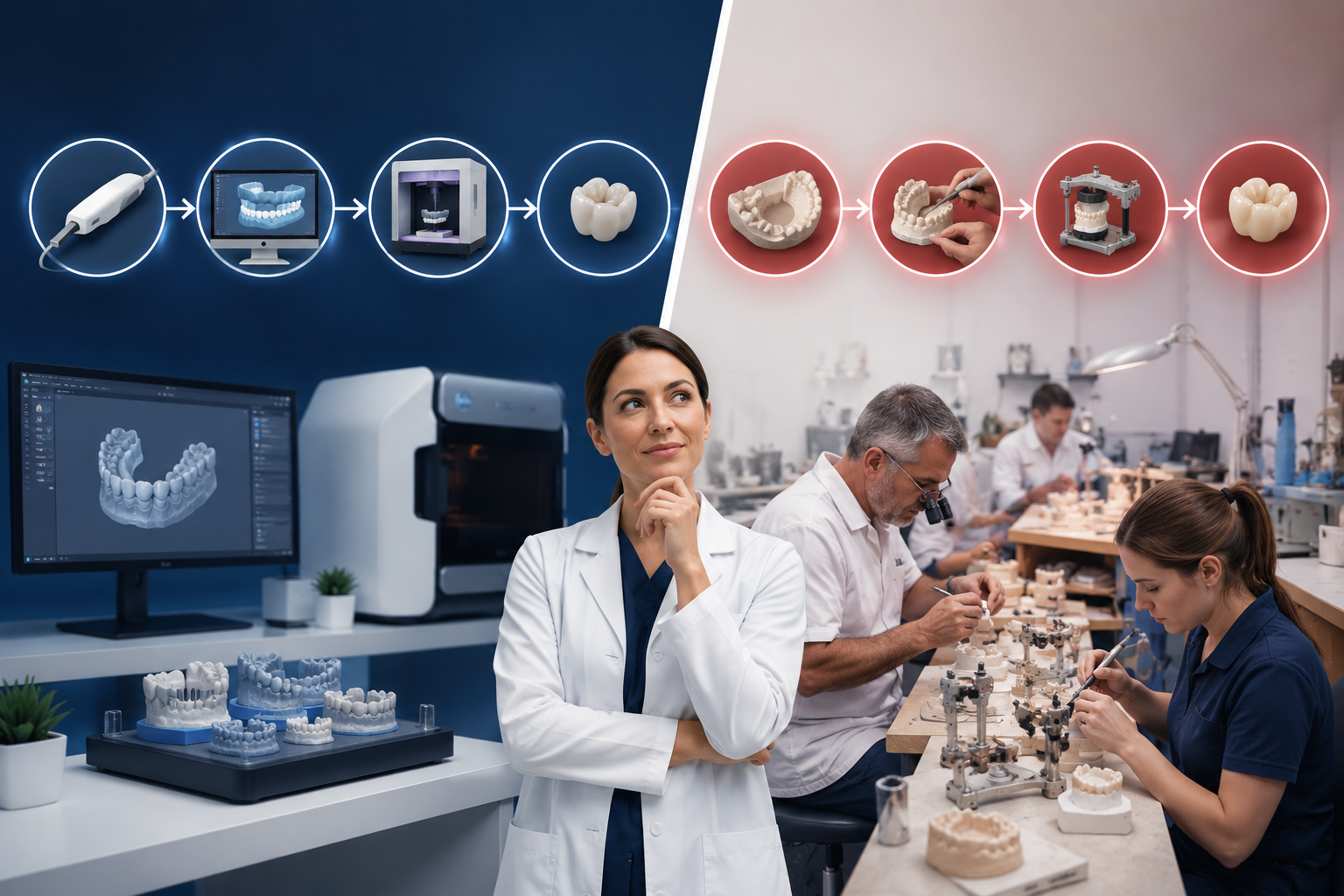
The digital workflow rewrote the script. Intraoral scanning, CAD design, milling, and 3D printing have transformed both how restorations are made and how the relationship between dentist and lab actually functions. For a clinician choosing how to run a restorative practice in 2026 and beyond, understanding the difference between these two workflows is no longer optional. It is the single most important decision affecting your case quality, turnaround time, profitability, and patient experience.
This article compares the digital and traditional dental lab workflows step by step, looks honestly at where each one still has a role, and helps you decide which path fits your practice.
Two Workflows, Two Philosophies
Before comparing steps, it helps to understand that digital and traditional are not just different tools. They are different philosophies of how dentistry should be produced.
The traditional workflow is craft-based. Every case begins with a physical impression, becomes a physical model, and is shaped by hand by a master technician. The lab's quality is measured by the skill of its technicians and the consistency of its handwork. Cases are tracked on paper or in basic case management systems, and the feedback loop between dentist and lab usually depends on a phone call, a fax, or a written prescription.
The digital workflow is data-based. Every case begins as a digital file, is designed in CAD software, and is fabricated by CNC milling units or 3D printers running on validated parameters. Quality is measured in microns, and every case carries a complete digital record from scan to delivery. Communication is asynchronous, screenshots replace phone tag, and the same file can be opened by the dentist, the technician, the milling machine, and the quality control reviewer simultaneously.
Both workflows can produce beautiful dentistry. They do not produce it the same way, and they do not produce it at the same speed.
Stage One: Capturing the Case
In the traditional workflow, capturing the case means taking an alginate or PVS impression. The tray is selected, the material is mixed, and the impression is set in the patient's mouth for several minutes. After removal, the impression is inspected for voids, drags, or pulls, and a second attempt is made if the result is not acceptable. The completed impression is poured in stone — sometimes at the office, more often at the lab — and the resulting model becomes the master record of the case.
This step is the single largest source of error in analog dentistry. Tray distortion, material setting variability, pour-up bubbles, and shipping delays all accumulate into a final model that is rarely a perfect representation of the prep. Add the inevitable aging and wear of the stone model over the case life, and the lab is often working from a reference that is already a few hundred microns off the original tooth.
In the digital workflow, capturing the case means scanning. An intraoral scanner builds a 3D point cloud of the prep, the adjacent teeth, the soft tissue, and the opposing arch in real time. The dentist sees the scan as it is captured and can re-scan any area that did not capture cleanly. The result is a stable digital file that does not distort, does not age, and can be reviewed by the lab within minutes of submission.
In direct comparison, the digital capture is faster (typically 4 to 8 minutes saved per appointment), more accurate at the margin, more comfortable for the patient, and easier to repeat. Conventional impressions still have a place in some specific clinical situations — deep subgingival margins where soft tissue management is challenging, or full-arch removable cases where intraoral scanners can struggle — but for the overwhelming majority of routine restorative cases, scanning has become the new standard of care.
Stage Two: Designing the Restoration
In a traditional lab, designing a restoration means waxing it up by hand. The technician examines the model, marks the prep, and sculpts wax over the master die until the contour, contacts, and occlusion are exactly right. This is one of the most respected crafts in the entire dental profession. A skilled wax-up technician produces results that are difficult to match, and there is no question that a beautifully waxed crown is a piece of art.
The challenge is that hand wax-up is slow, single-instance, and dependent on the individual technician. If that technician is out for the day, the case waits. If the technician retires or moves on, their experience and their style leave with them. And if a small adjustment is needed after the case is cast, the wax is gone — the technician is rebuilding from scratch.
In a digital workflow, designing the restoration means CAD design. The scan is loaded into design software, the prep is identified, the margin is marked, and a virtual restoration is built using a tooth library, occlusion analysis tools, and contact verification overlays. The technician's expertise is still essential — software does not design good crowns by itself — but the work is faster, repeatable, and saved as a file that can be referenced for years.
CAD design has another advantage that traditional workflows simply cannot replicate. The dentist can see the restoration before it is fabricated. A 3D preview, a marked screenshot, or a brief video of the design can be shared in seconds and approved or adjusted before any material is consumed. Surprises at the seat appointment become rare because the design was confirmed before the case was made.
Stage Three: Fabricating the Restoration
The traditional fabrication process varies by material. For metal-ceramic crowns, the wax-up is invested, the metal is cast, the porcelain is layered and fired, and the surface is hand-glazed. For all-ceramic restorations, the wax-up is pressed into a ceramic ingot, cleaned, and finished by hand. Each of these processes involves multiple firings, manual cooling cycles, and a finishing step that depends on the skill of the technician at the wheel.
The output is excellent when the technician is excellent. The cycle time, however, is long. A single-unit case can easily take three to five business days to move through the traditional production sequence, and a complex case with a custom abutment or a layered aesthetic restoration can take seven to ten days or more.
The digital fabrication process replaces casting and pressing with milling and 3D printing. A puck of zirconia, lithium disilicate, hybrid ceramic, or PMMA is loaded into a five-axis CNC milling machine. The CAD design is sent to the mill, and the restoration is cut to a precision of 25 to 50 microns. Sintering, glazing, and final polishing follow, but the core shape of the restoration is determined by the digital file rather than by handwork.
For surgical guides, models, custom trays, dentures, and a growing list of provisional materials, 3D printing has taken over completely. A high-resolution dental printer can produce a full-arch surgical guide in under an hour and a series of denture try-ins in a single afternoon.
The fabrication time advantage of digital is real. A typical crown that took five business days through a traditional workflow can be completed in three days, sometimes less, in a digital lab that controls its own milling and printing capacity. For implant cases the gap is even larger because custom abutments that used to require a wax-up, a casting, and finishing can now be milled from titanium in a single shift.
Stage Four: Quality Control and Delivery
Quality control in a traditional lab is visual and tactile. The technician inspects the casting, checks margins under magnification, verifies contacts on the model, and confirms occlusion against the opposing cast. If anything is off, the case is sent back for adjustment or remake. The audit trail is whatever the technician wrote on the case slip.
Quality control in a digital lab is layered. The CAD design is checked for margin accuracy, contact tightness, occlusal contact distribution, and minimum thickness in millimeters. The milled or printed restoration is inspected against the same digital reference. Calibration logs, machine maintenance records, and material lot numbers are stored alongside the case file. If a problem is detected later, the lab can reproduce the exact conditions of the original fabrication.
This matters for the dentist because it changes the conversation when something does need to be adjusted. Instead of "I think the lab made it a little wide," the discussion becomes "the contact was designed at 50 microns of clearance, here is the screenshot, and here is the milling tolerance log." Problems get solved faster, and the same problem rarely happens twice.
Where the Two Workflows Compare on the Numbers
Across a representative restorative case, the workflow comparison looks roughly like this:
Capture time at the chair is 4 to 8 minutes shorter with digital scanning. Lab production time is typically 30 to 50% shorter for routine crown-and-bridge cases, with the most aggressive digital labs delivering single units in three business days. Remake rates that hover around 5 to 10% in traditional labs typically fall to 1 to 3% in well-run digital labs. First-time fit rates that sit around 80 to 90% in analog cases typically rise to 95 to 98% in digital cases. Chairside adjustment time at the seat appointment falls by 5 to 15 minutes per case.
These numbers compound. A practice that completes 400 restorative cases per year, sees a 12-minute average chair time saving per case, and reduces its remake rate by five percentage points captures somewhere between $40,000 and $60,000 of additional production capacity annually — without adding a single hour to the schedule.
Where Traditional Still Has a Role
It would be dishonest to claim that traditional dentistry has no place. There are still clinical situations where conventional impressions, hand wax-ups, and analog techniques produce excellent or even superior results. Highly customized aesthetic anterior cases, full-arch removable prosthetics with complex tissue contours, and certain niche specialty cases still benefit from the eye and the hand of an experienced ceramist.
The most realistic answer for the modern practice is not "abandon traditional entirely." It is "default to digital, and reserve traditional for the cases where it genuinely adds value." A digital dental lab worth partnering with will keep that hybrid capability available for the cases that need it.
Where the Hybrid Model Falls Short
The trap many practices fall into is what is sometimes called the digital impression with analog lab pattern. The dentist invests in a scanner, sends digital files to the lab — and the lab prints a model from the scan, pours stone over it, and proceeds with traditional wax-up and casting. The chair time benefits of scanning are real, but the lab production cycle and remake risks of analog remain.
This is one of the most common reasons dentists try digital, do not see the productivity gains they expected, and conclude that digital is overhyped. The diagnosis is almost always the same: the lab is not actually digital. It is analog with a printer at the front door.
To capture the full benefit of the digital workflow, the dentist and the lab both need to be digital from end to end.
Choosing Between the Two Workflows
The honest answer for almost every general practice in the United States in 2026 is that the digital workflow is the default, and the traditional workflow is the exception. The cost of digital scanners has come down dramatically, the case quality from a well-run digital lab is at least as good as the best analog work, and the productivity, predictability, and patient experience advantages are too large to ignore.
The question is no longer whether to move to digital. It is which lab to move to, and how quickly the rest of the practice's systems can adapt to take full advantage of what digital makes possible.
Make the Switch With a Lab That Has Been Digital From the Start
PROCERAM Dental Digital Lab was built around a fully digital workflow. Our team has spent more than three decades refining the process — the scanning standards, the CAD protocols, the milling and printing parameters, the quality control checks, and the communication systems that turn a digital impression into a restoration that fits the first time, every time.
If you are scanning but not capturing the productivity benefits, or if you are still on traditional workflows and ready to make the leap, we should talk.
Contact PROCERAM Dental Digital Lab today: Phone: +1 (385) 425-8770 Email: Office@ProceramDentalLab.com Web: www.ProceramDentalLab.com Located in Draper, Utah — serving dentists nationwide.
